Interactive dashboards embedded in MCP-based AI chat clients
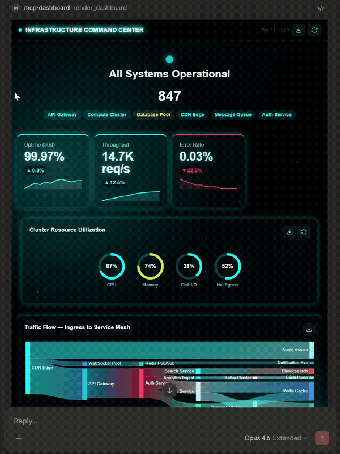
mcp-dashboards, developed by KyuRish, adds visual dashboards to MCP-based assistants so AI responses are not text-only. The tool renders interactive charts, KPI widgets, and live polling elements inside compatible chat windows for immediate data inspection. It pairs a large chart library with multiple visual themes and export options. Data analysts, software developers, and business users who use AI for exploration get direct, in-conversation visual feedback.
What tasks can you actually use it for?
The app presents interactive dashboards and widgets inside the assistant conversation, enabling quick data inspection, inline KPI displays, and session polling without leaving the chat. Concrete in-chat outcomes include:
- ad-hoc data exploration alongside assistant replies
- KPI hero widgets embedded in a response
- live polling for stakeholder input inside the session
How detailed are the visualization options?
Visual output derives from a substantial library: the tool exposes 32 chart tools and over 45 subtypes, and offers 21 themes plus four visual discovery catalogs. Sample renderings include stacked and drilldown bar charts, heatmaps, flowcharts with multiple node styles, hero widgets, and multi-layered line graphs. This range supports modest-to-complex visualization needs directly in the assistant interface.
What inputs and environments does it require?
The app runs as an MCP server and requires a Node.js environment to launch via npx, offering a zero-configuration start command. Supported MCP clients listed include Claude Desktop, Claude Web, VS Code, Goose, Postman, and MCPJam. Because it depends on MCP Apps compatibility, rendering occurs only inside MCP-enabled platforms that accept MCP server connections.
Does it fit naturally into developer and analyst workflows?
Installation through npx and a minimal runtime requirement reduce setup overhead for teams familiar with Node.js. The developer has released other MCP server implementations, indicating continued engagement with the MCP ecosystem and interoperability focus. For product teams that embed conversational UIs, the app supplies a UI surface inside sessions so exploration and initial presentation stay within the assistant workflow.
A practical, ecosystem-focused choice with a clear scope
The tool is a pragmatic option for teams working inside the MCP ecosystem who need immediate, in-conversation visual output. It supports one-click export to PNG, PowerPoint, and A4 for external use, and its status as a pioneering MCP App in the developer community reinforces its integration role. Expect to verify critical figures against source data before using exported visuals in formal reports.